I read an article recently in which the author chronicled his transformation from lecturer to facilitator of peer instruction (Don’t Lecture Me: Rethinking How College Students Learn). I, of course, thought about his comments in regard to e-learning. How often do we see instructional designers create lessons that ask our learners to passively absorb information through reading or listening? Basically, we've taken the f-2-f lecture format and made it even more passive and - shall I say it? - uninspiring - than the lecture from which it was derived!
Many instructional designers begin and end with the content delivered by the SME, which is highly focused on what the learner needs to know by the end of the instructional period. What we really need to do is use that content to decide what the learner needs to DO by the end of the instruction. Not long ago, I created a graphic and posted it here in the blog. The graphic, part of which is repeated below, tells us to first, define the goal of this learning, then identify the actions learners can take to reach the goal.
It's not enough to focus our efforts on getting the content complete and correct. We have to create opportunities for the learners to apply the information contained within the course to solve something - whether it be how to solve a math problem or how to conduct an interview.
I work for a college, so I'm all about applied learning. Come to think of it, I'd be about applied learning if I worked for a university! I believe that focusing on content leaves a very large gap between the passive transfer of information in an educational environment and learners' performances in the real world, doing real world tasks.
My final word (for now):
Content alone will not be enough to engage your learners. !Ever!
More on this next post.
Thursday, March 1, 2012
Wednesday, February 1, 2012
Designing learning for today's learners
A few days ago, I found an image that depicted the many ways educators can use ICT to engage and challenge their learners. I decided to create a similar graphic, but I used images of people interacting with various technologies instead of the spheres in the original. This is the image I created:
Are you keeping up? If you're teaching face-to-face, do you show YouTube videos in class? Do you ask your learners to collaboratively solve a problem using a smart-board? Do you exchange texts or bring in guest speakers via video conferencing? Elicit comments through clickers or smartphones? If you're not doing all or most of the above, you should be. In but a few more years, what we now consider blended learning (classroom based + ICT) will become the standard. Today's learners want to be educated using the tools they use every day. Learners have become consumers of educational goods - if we don't supply them with the tools and experiences they're looking for - they'll simply take their business elsewhere.
If you teach online, are you using the technologies available to you? Do you use web conferencing in a collaborative way, or are you replicating the sage on the stage electronically? In one of our portfolio classes, we ask the students to create an electronic portfolio, then present it to their classmates and the instructor live through our web conferencing platform. If you're on a smaller budget, you can accomplish the same thing with Skype. Social media sites are a great place to post lesson plans and assignments. Twitter is a great way to keep in touch. No longer should interactions in an online class be relegated to the (asynchronous) discussion forum or course email. Use the technologies available to you to reach out and interact with your learners - in a way that they're accustomed to.
(Or you'll lose them)
Are you keeping up? If you're teaching face-to-face, do you show YouTube videos in class? Do you ask your learners to collaboratively solve a problem using a smart-board? Do you exchange texts or bring in guest speakers via video conferencing? Elicit comments through clickers or smartphones? If you're not doing all or most of the above, you should be. In but a few more years, what we now consider blended learning (classroom based + ICT) will become the standard. Today's learners want to be educated using the tools they use every day. Learners have become consumers of educational goods - if we don't supply them with the tools and experiences they're looking for - they'll simply take their business elsewhere.
If you teach online, are you using the technologies available to you? Do you use web conferencing in a collaborative way, or are you replicating the sage on the stage electronically? In one of our portfolio classes, we ask the students to create an electronic portfolio, then present it to their classmates and the instructor live through our web conferencing platform. If you're on a smaller budget, you can accomplish the same thing with Skype. Social media sites are a great place to post lesson plans and assignments. Twitter is a great way to keep in touch. No longer should interactions in an online class be relegated to the (asynchronous) discussion forum or course email. Use the technologies available to you to reach out and interact with your learners - in a way that they're accustomed to.
(Or you'll lose them)
Wednesday, January 18, 2012
ADDIE Interactive!
I only had a few spare minutes, so I decided to create a quick and dirty demo of an interactive application to match 7 definitions to the phases of ADDIE to which they belong.The following is a Screenr presentation that shows a user (me) interacting with the app. Sorry, no audio! The app is built with Dreamweaver's Coursebuilder.
Wednesday, November 30, 2011
Focusing on activities
Why do so many online courses focus on content? If your
learners have a text book, why do so many instructional designers feel they
have to replicate the text in the online course? What does this accomplish?
Well, I’ve been pondering those questions for years – and asking
my colleagues to focus on creating activities to support the learning
objectives rather than paraphrase the text. It’s more difficult, it takes
longer…and it can lead to an excellent learning experience…
So how do we create activities not content? Some
instructional designers argue that because they are not content experts, they
can’t be expected to be able to determine what the learners need to know at the
end of a lesson. Well, I do a lot of developing sans content expert, and here’s
what I’ve discovered: if I have a good learning objective, I can design
activities to support that objective. If the objective is a simple “Describe…. “
(I hate those) I can have the learners search out descriptions on the web, in their text, or through conversations with
others. Better yet, I can give them the descriptions and ask them to match them
to terms using a simple interactive application. Ever play My Word Coach for
the DS or Wii? One of the quizzes in that program does just that – except you’re
racing against the clock. As you proceed through the levels, the terms and
definitions keep coming back to you in various games, and at the end of each
level you’re almost certain to have a far better understanding of the term than
you did at the start of the instruction.
Instead of providing content, I provided an interactive
activity that my learners would enjoy – and that would help them learn and
understand the terms they need to be able to go on to the next activity. Next
post, I’m going to tell you how and why I designed that activity.
Tuesday, November 1, 2011
HOTS (Or Bloom, Part II)
In my previous post, I told you about designing learning activities for a group of students learning group counselling skills. The plan was to have them collect (and remember) information, understand it, and apply it (by leading the group). Sometimes, we need to move the learners past apply and on to analyzing, evaluating, and creating new meanings. In the case of our soon-to-be counsellors, we've already begun to push them toward the acquisition of higher order thinking skills.
After our learners took turns leading the group, we had them discuss their experiences. This gave them a chance to analyze their behavior as group leader - and to receive advice and opinions from their peers. We asked them to evaluate both their own performance and the performance of the others in the team.
Create is the highest level in the modified taxonomy. What we're eventually going to do with our counselling students is have them put together everything they've learned in this module to create their own facilitation plan for a group meeting with their clients.
After our learners took turns leading the group, we had them discuss their experiences. This gave them a chance to analyze their behavior as group leader - and to receive advice and opinions from their peers. We asked them to evaluate both their own performance and the performance of the others in the team.
Create is the highest level in the modified taxonomy. What we're eventually going to do with our counselling students is have them put together everything they've learned in this module to create their own facilitation plan for a group meeting with their clients.
Monday, October 31, 2011
Let Bloom guide your learning design
When I design a course, I start by trying to get a feel for the prospective learners. Who are they? What do they expect from this course? What do they already know? Then I start thinking about how to design learning suited to their needs - learning that's interesting, effective, and on point.
If the learners are new to the subject matter, I'll start by getting them to discover pertinent information about the topic. This is the lowest level of Bloom's Taxonomy; before you can understand or apply a concept or theory, you first have to possess the information, and work at finding ways to understand it. Bloom called this lowest level Knowledge, but most of us now use the updated term 'Remember'. The images below document the changes, the biggest of which is a change from using nouns to verbs to describe the levels:
Traditionally, educators - from K12 to post-secondary - presented information to learners through lectures or reading assignments. I find those methods a bit too static, and truth be told, boring! I flash back to my undergraduate days, when my economics prof used to read to us - from the book - in the dullest of monotones. I swore I'd never do that to my learners.
So how can we design learning that will get the required information to the learners without boring them silly? Well, one thing we can get them to do is to search out the information themselves, using the net, the school library, family, friends, magazines, videos, books...whichever way works best for them. When they've gathered the information, get them to discuss it. If this is a F2F class, use a discussion circle, a buddy system, or small groups. If you're in an online class, use the discussion board - or - better, use your web conferencing system to hold a group discussion. In either case, you can have your learners create videos, slide shows, or audio to help them present their findings. As they gather and subequently discuss and present their findings, they will have a much better understanding of it, which is the second level of Bloom's Taxonomy.
The third level of Bloom is Apply. We can't apply information until we've gathered it, remember it, and understand it. Take the case of a group of students learning group counsellimg skills (this is from a course I'm working on). First, I have the students find information related to group management, facilitation strategies, team dynamics, personalities, etc. Then they discuss what they've found and come to an understanding of what they need to know to become effective counsellors. The information is no good to them in a vacuum. They need to apply it. What better way than to lead a group? After they've each led the group, they'll get feedback from the course facilitator and the other group members.
FYI, years ago, when I took a 'train the trainer' type course, the facilitator took a video of each of us as we presented so we would be able to see how we looked and sounded. It was a great learning tool.
The next three stages of the taxonomy focus on analyzing, evaluating, and creating. Next post we'll concentrate on these HOTS - higher order thinking skills.
If the learners are new to the subject matter, I'll start by getting them to discover pertinent information about the topic. This is the lowest level of Bloom's Taxonomy; before you can understand or apply a concept or theory, you first have to possess the information, and work at finding ways to understand it. Bloom called this lowest level Knowledge, but most of us now use the updated term 'Remember'. The images below document the changes, the biggest of which is a change from using nouns to verbs to describe the levels:
So how can we design learning that will get the required information to the learners without boring them silly? Well, one thing we can get them to do is to search out the information themselves, using the net, the school library, family, friends, magazines, videos, books...whichever way works best for them. When they've gathered the information, get them to discuss it. If this is a F2F class, use a discussion circle, a buddy system, or small groups. If you're in an online class, use the discussion board - or - better, use your web conferencing system to hold a group discussion. In either case, you can have your learners create videos, slide shows, or audio to help them present their findings. As they gather and subequently discuss and present their findings, they will have a much better understanding of it, which is the second level of Bloom's Taxonomy.
The third level of Bloom is Apply. We can't apply information until we've gathered it, remember it, and understand it. Take the case of a group of students learning group counsellimg skills (this is from a course I'm working on). First, I have the students find information related to group management, facilitation strategies, team dynamics, personalities, etc. Then they discuss what they've found and come to an understanding of what they need to know to become effective counsellors. The information is no good to them in a vacuum. They need to apply it. What better way than to lead a group? After they've each led the group, they'll get feedback from the course facilitator and the other group members.
FYI, years ago, when I took a 'train the trainer' type course, the facilitator took a video of each of us as we presented so we would be able to see how we looked and sounded. It was a great learning tool.
The next three stages of the taxonomy focus on analyzing, evaluating, and creating. Next post we'll concentrate on these HOTS - higher order thinking skills.
Tuesday, October 25, 2011
Pushing a scenario to help college students with interview skills
Recently, I was working on a course to prepare college students for life after graduation. You know the drill: resume preparation, job search skills, interview etiquette - the whole nine yards. As online courses go, it's pretty good. We provided lots of opportunities for the students to interact with the materials, the facilitator, and each other. We had them post to the discussion board, prepare an electronic portfolio, and present the portfolio to the group through a web conferencing session.
I sit here today trying to figure out how we could have done it better. For all our efforts, we were still pushing the bulk of the learning materials to the students. How could we get them to pull the information instead? And then it clicked. A scenario could pull all of this together!
I quickly mapped out the beginnings of a scenario in PowerPoint 2010, as seen below:
This is a simple hyper-linking procedure in PowerPoint 2010. In the first slide, choosing Google brings the user to slide two, and explains why the choice is incorrect. If the user answers FaceBook, they are brought to Slide four, which is also incorrect.. If the user picks either of these incorrect answer choices they will not be able to proceed. The company's website answer is the correct option, so that option brings the user to the next challenge slide.
The next challenge presents the student with two choices to prepare for the interview:
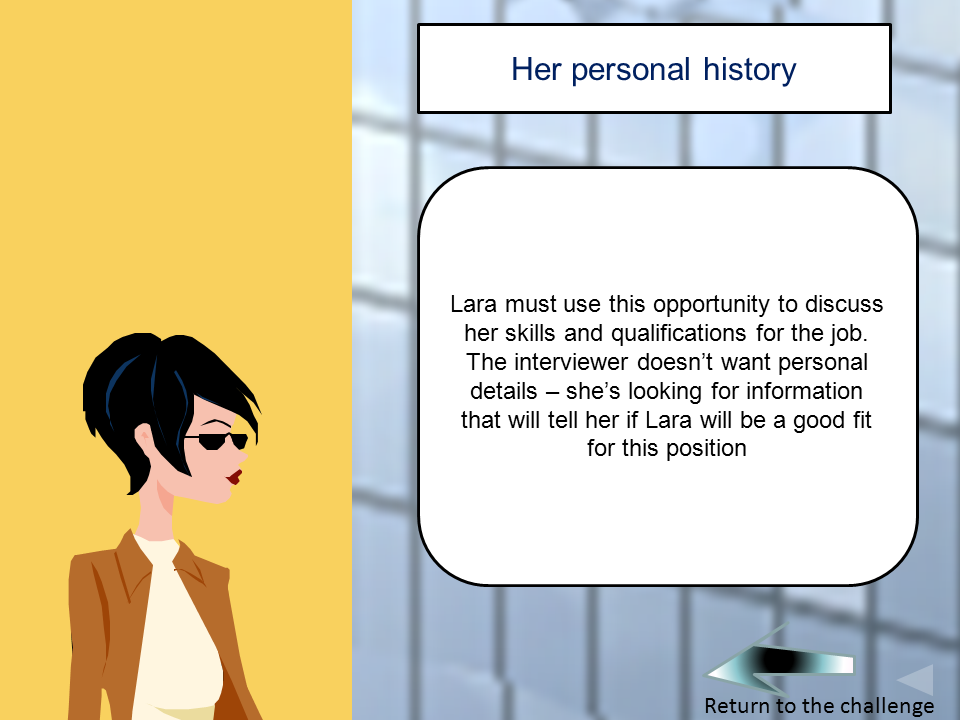
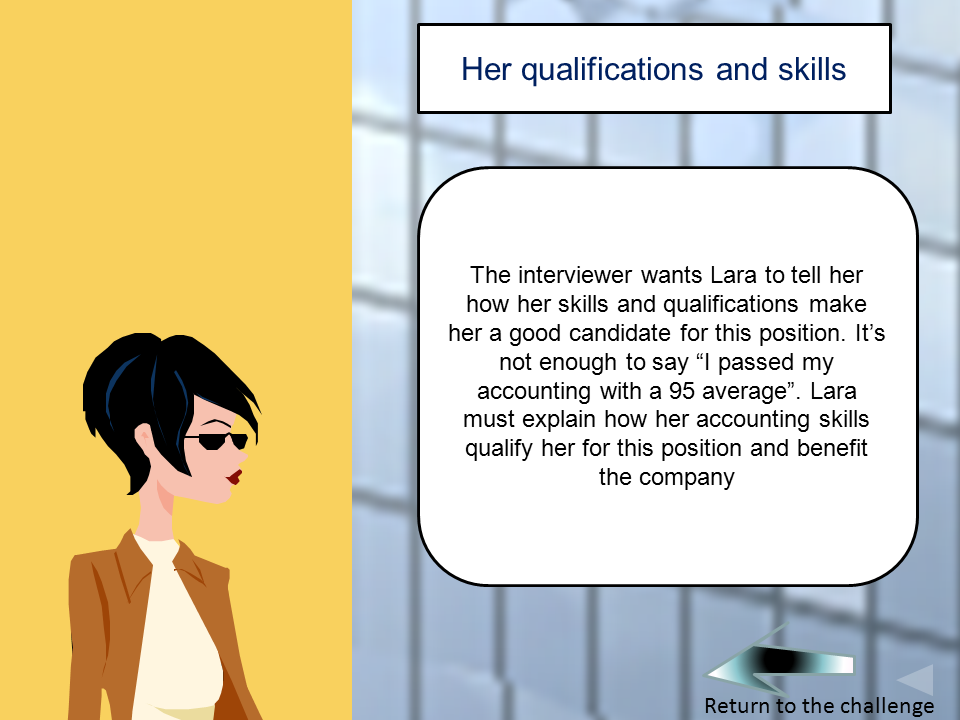
The third challenge is the interview itself. I'm not going to show you all the slides, but the scenario is this: you reach the interview room, meet the interviewer, and exchange greetings. After that, the interviewer asks your avatar (Lara, in this case) to tell her about herself.
The next few challenges ask you to answer some standard interview questions. After those are completed, you'll be taken to another slide that provides even more resources for you to examine. How is this better than pushing content? I believe that giving the student the flexibility to choose different responses - and providing feedback - will help them to see how the interview process might function in real life.
After the presentation is complete, I'll convert it to flash and post it.
I sit here today trying to figure out how we could have done it better. For all our efforts, we were still pushing the bulk of the learning materials to the students. How could we get them to pull the information instead? And then it clicked. A scenario could pull all of this together!
I quickly mapped out the beginnings of a scenario in PowerPoint 2010, as seen below:
This is a simple hyper-linking procedure in PowerPoint 2010. In the first slide, choosing Google brings the user to slide two, and explains why the choice is incorrect. If the user answers FaceBook, they are brought to Slide four, which is also incorrect.. If the user picks either of these incorrect answer choices they will not be able to proceed. The company's website answer is the correct option, so that option brings the user to the next challenge slide.
The next challenge presents the student with two choices to prepare for the interview:
The third challenge is the interview itself. I'm not going to show you all the slides, but the scenario is this: you reach the interview room, meet the interviewer, and exchange greetings. After that, the interviewer asks your avatar (Lara, in this case) to tell her about herself.
The next few challenges ask you to answer some standard interview questions. After those are completed, you'll be taken to another slide that provides even more resources for you to examine. How is this better than pushing content? I believe that giving the student the flexibility to choose different responses - and providing feedback - will help them to see how the interview process might function in real life.
After the presentation is complete, I'll convert it to flash and post it.
Labels:
e-learning,
education,
elearning,
instructional design,
learning,
post-secondary,
powerpoint,
scenario,
teaching
Subscribe to:
Posts (Atom)